Topics
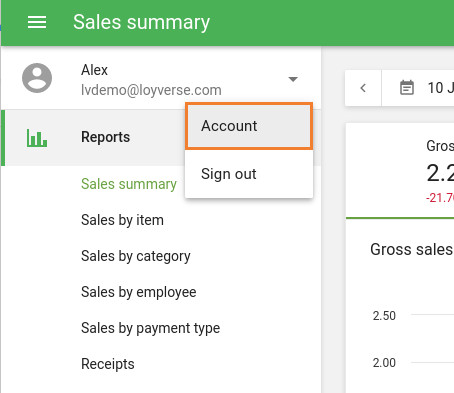
Every Loyverse user — both the owner and employees — with Back Office access has a personal account settings page.
To access it, click Account in the Back Office main menu.
What You Can Change
All users can update the following settings:
- Email — The email address associated with the account.
- Password — The account login password.
- Timezone — Affects when low-stock notifications are sent. Each user can set their own timezone independently.
- Interface Language — Sets the Back Office display language for that user only. Changing this does not affect the language settings of other users on the same account.
Note: Changing your email or password requires password confirmation for security purposes.
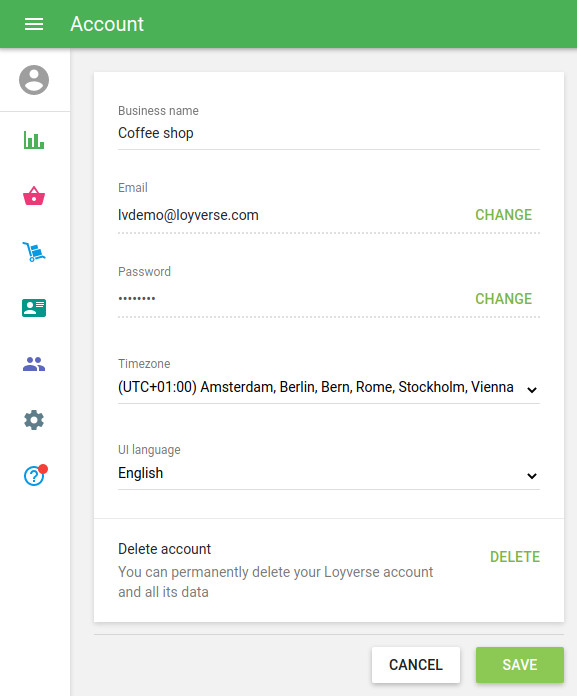
The following options are available to the account owner only:
- Business Name — Update the name of the business.
- Delete Account — Permanently removes the account.
Warning: Deleting the account will permanently erase all sales data, account settings, and associated records (items, discounts, taxes, customers, etc.). It will also cancel all paid subscriptions and unsubscribe from all email newsletters. This action cannot be undone.
See also: